
Trigger word for publishing
Activation Engine's Trigger Words enable user-initiated activations on Facebook and Instagram, allowing businesses to automate responses and interactions. By defining specific words or phrases, brands can enhance engagement, provide instant replies, and trigger activations. This guide explains how Trigger Words work, their benefits, and how to implement them effectively.
What are Trigger Words?
Trigger words are specific keywords that users can send via direct message or post comments to initiate an automated interaction with your brand. When a user types a defined trigger word, Activation Engine automatically launches a pre-built activation, such as starting an activations or initiating a chatbot conversation.

Example Use Case:
Contest Entry via Instagram Comments: The Thunderhawks basketball team runs a contest where users can enter by commenting "Join" on the contest IG post. Once the user replies the comment “Join”, Activation Engine detects the trigger word and starts a conversation flow activation, guiding the user through the contest entry process.
Contest Entry via Facebook Messenger: Users can also enter the contest by sending "Join" as a direct message on Facebook Messenger. This triggers an automated response of the conversation flow, providing contest details and confirming their participation.
Trigger Word Activation Flows
Trigger words can be used in different ways depending on the platform and type of interaction:
Private Reply to a Post (Instagram): When a user comments on a post with the trigger word, Engage Engine automatically triggers a conversation flow activation via Instagram DM.
Direct Message Activation: Users can send a DM containing the trigger word to the Account's Facebook Page Messenger, Instagram Direct Messages, or Engage Engine Messenger. Once detected, Activation Engine automatically responds and starts the designated activation conversation flow, guiding users through the next steps based on the predefined conversation setup.


Important Notes:
Trigger words can be part of a sentence – When the "Make the trigger word part of a sentence" checkbox is enabled, the activation will trigger even if the word is used within a longer sentence. For example, if the trigger word is "Birthday," messages like "Happy Birthday!" or "Have a great birthday!" will also activate the flow.
Emojis can be used as trigger words – You can set an emoji as a trigger, allowing users to initiate interactions using visual symbols.
Trigger words are not case-sensitive – Words like "JOIN," "Join," and "join" will function the same way.
How to Use Trigger Words in Engage Engine
Note: Trigger words are accessible for conversation flow activations only.
Private Replies to Post Comments
Engage Engine allows you to set trigger words that start an activation when a user comments on an Instagram post.
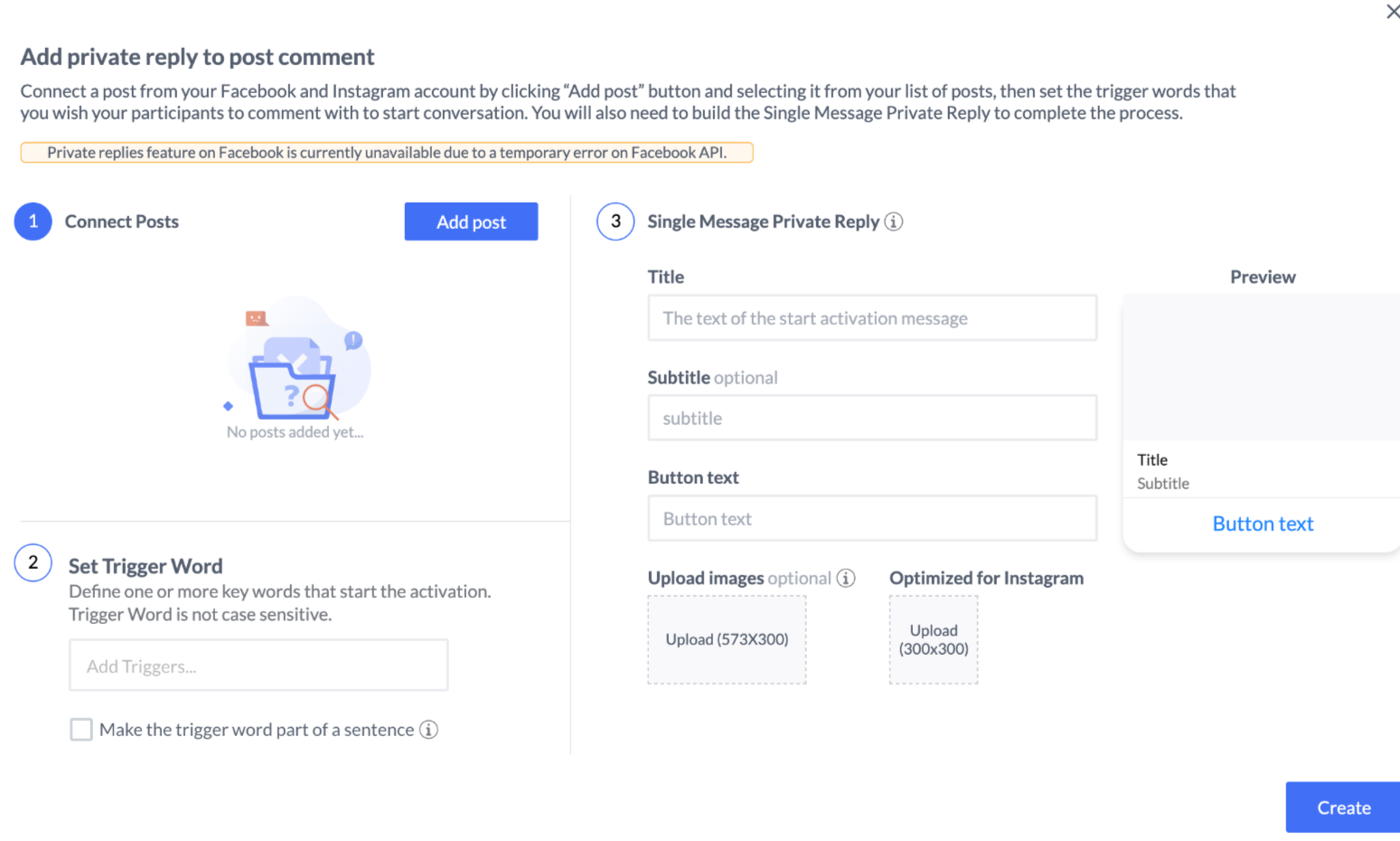
Step-by-Step Guide:
Click Create – Navigate to the Trigger Words section in the activation "Publish" tab and click Create.
Connect Your Post – Select an Instagram post that will be associated with the trigger word.
Set Trigger Words – Define one or more keywords that will trigger an activation when a user comments on the post.
Configure the Single Message Private Reply – As part of Meta’s policy, a Single Message Private Reply must be added in order to initiate the conversation. Create a message with a button that will guide users to the next step of the conversation.
Save – Once everything is set, save your settings, and Engage Engine will automatically respond when users comment with the designated trigger word.
Remember to toggle on the Private reply to post comments option.

There are some limitation due to Meta’s policy:
Only one message can be sent to the person who commented
The message must be sent within 7 days from when the post or comment was created
Only when a person responds to the private message can you continue the conversation within the 24-hour messaging window.
When a new trigger word with a private reply is added, a grayed-out widget appears on the conversation flow canvas, indicating the starting point of the conversation.

Direct Message Activation
Trigger words can also initiate activations via direct messages (DMs) on Facebook Messenger, Instagram DM, or Engage Engine Messenger.

Step-by-Step Guide:
Set the Trigger Word – Define one or more trigger words that users must send via DM to start an interaction.
Configure the Automated Response – Set up the response message users receive when they send the trigger word. You can customize this message to include text, links, or interactive elements.
Save – Save your settings, and Engage Engine will handle automated responses whenever users initiate a DM with the set trigger word.
Toggle on the Direct Message option
By integrating trigger words into your digital engagement strategy, you enable user-initiated activations that seamlessly guide interactions and enhance audience participation across platforms like Instagram and Facebook.