
Creating New Campaigns in Activation Engine
Why are Campaigns Important?
Drive Sales and Revenue
One of the most important benefits of launching a marketing campaign is that it can help drive sales and revenue. By creating an attractive, creative, and engaging campaign for your fans, you can influence customers to explore your products, team, brand, or services.
Increase Brand Awareness
Another key benefit of running an activation campaign is increasing brand awareness. When done correctly, your activation will reach a large audience and help them learn more about your brand. This increased awareness can lead to more customers and sales in the long run.
Build Relationships with Customers
By creating targeted content and engaging with customers on social media, you can develop a strong rapport and show them that you value their support and needs. These relationships can lead to repeat business and referrals over time.
Creating a Campaign
To create a new campaign:
Navigate to the Campaigns section on the top menu bar.
Click "+ New Campaign".
Enter the campaign name and select its type.
Finalize by clicking the Create button.
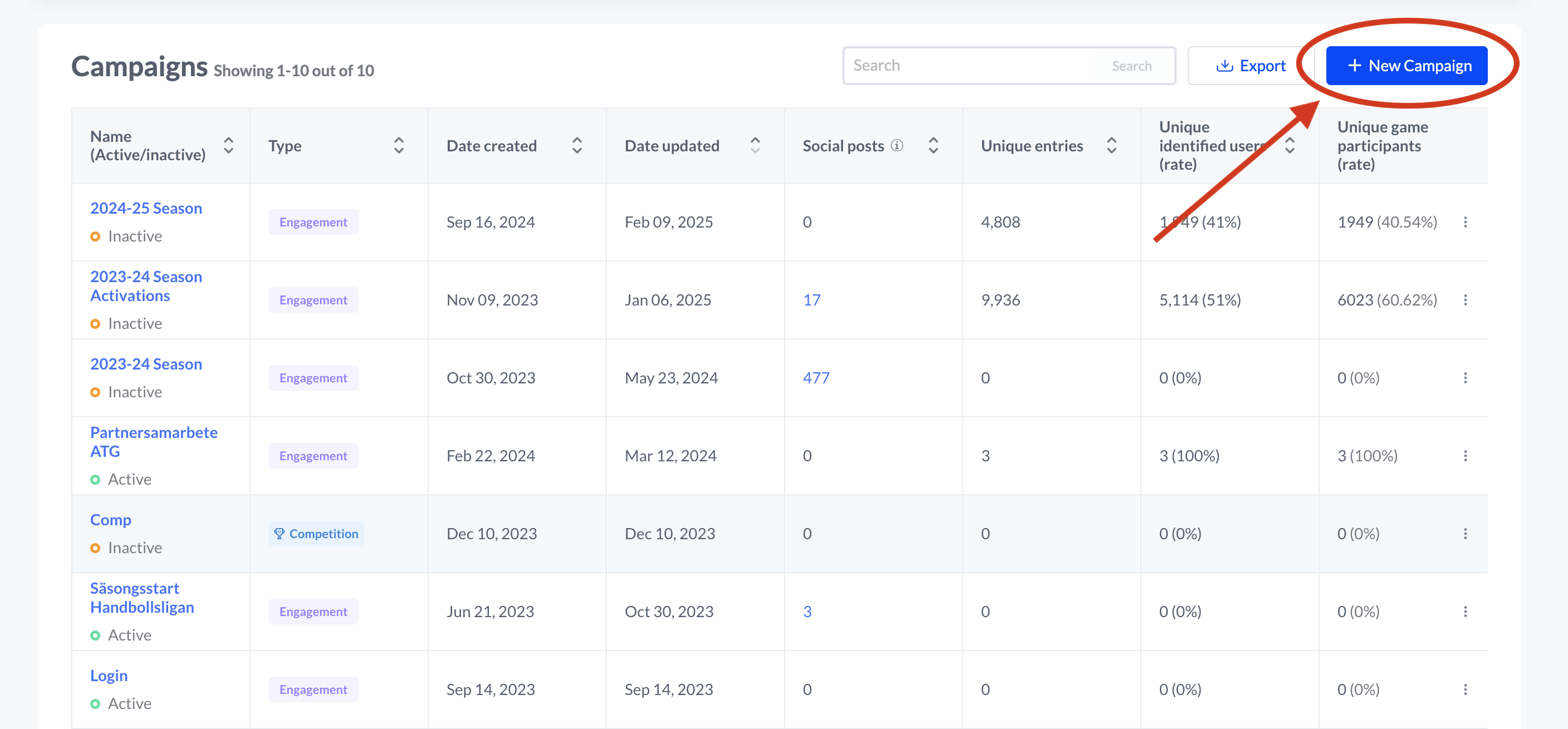
Naming your campaigns with a clear and structured convention is recommended to maintain organization and improve tracking.

Example Naming Conventions:
Good: MVP of the Game 2022-23
Bad: Quiz Campaign 1
Types of Activation Campaigns
Engagement Campaigns: Focused on improving audience interactions, engagement campaigns encourage users to participate in various activities that foster brand loyalty.
Sales Campaigns: Directly aimed at boosting revenue, sales campaigns focus on product promotions, special offers, and strategic marketing to convert potential customers.
Sponsor Campaigns: Designed for partnerships with brands, influencers, or organizations, sponsor campaigns help leverage external audiences for mutual benefits.
Competition Campaigns: Built specifically for longterm activation of fans, competition campaigns allow you to track and manage participants’ scores across various activations. These campaigns provide a dynamic leaderboard, fostering friendly competition among fans and encouraging engagement.
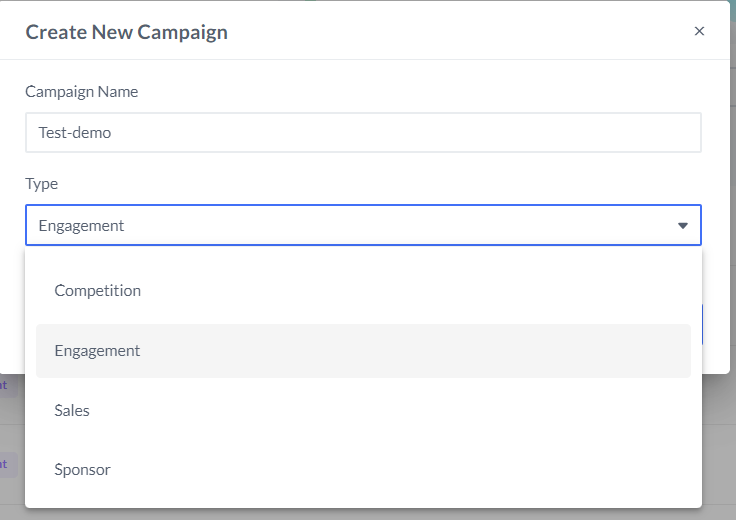
Campaigns Summary & Metrics
Campaign performance is crucial to understanding the impact of your marketing efforts. The Campaigns Summary provides insights into key metrics:
Total Campaigns: The number of active and past campaigns.
Participants: The number of users actively engaging in activations.
Average Click-Through Rate (Avg. CTR): Measures the proportion of participants who clicked links within activations.
Completion Rate: Indicates the percentage of users who completed activations successfully.
With these insights, you can refine your marketing strategies and optimize future campaigns for better engagement and conversions. Export campaigns to view the full insights for all campaigns.
Exporting Campaign Data
Activation Engine allows you to export campaign data efficiently for further analysis and reporting.
How to Export Campaign Data
Navigate to the Campaigns section.
Click the "Export" button at the top right of the campaign table.
Choose the format for your export (CSV, Excel).
Download the file and analyze all campaign details, including:
Campaign name, campaign id, type, and status.
Date create and date updated.
Unique entries
Unique identified users and unique identified users rate
Unique game participants and unique game participants rate
Unique game completions and unique game completions rate
CTA clicks and CTA click-through rates
Additional Data from Content Planner