
Exporting Data Points Reports
Effortlessly Export Your Data for Powerful Analysis
Need to export your valuable Engage Engine data for further analysis? We've got you covered! There are various options you can export data:
Individual Activation Exports:
Game Performance: Export data specific to a single activation for focused analysis. Simply choose the desired activation and download the data as a CSV or XLSX file – whichever format best suits your needs.
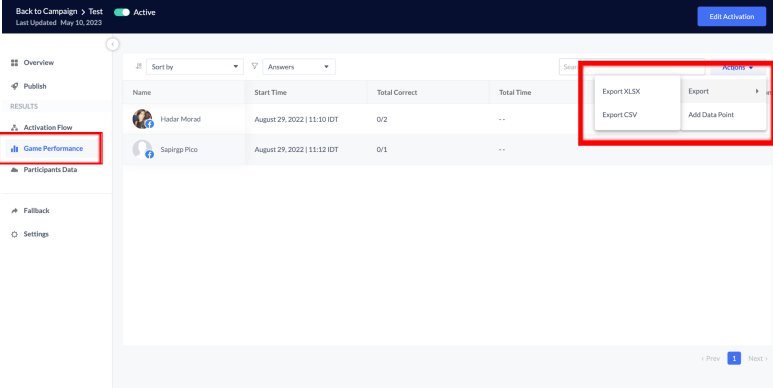
For individual activation exports, access the "Game Performance" section on the activation dashboard and click "Actions -> Export."
Participants data: ??????
Comprehensive CRM Export : Access your entire Engage Engine data points set through the CRM. This powerful tool allows you to leverage advanced filtering capabilities to pinpoint the exact data you need. Once you've narrowed down your selection, export the filtered data as a CSV or XLSX file for seamless integration with your preferred analytics tools.
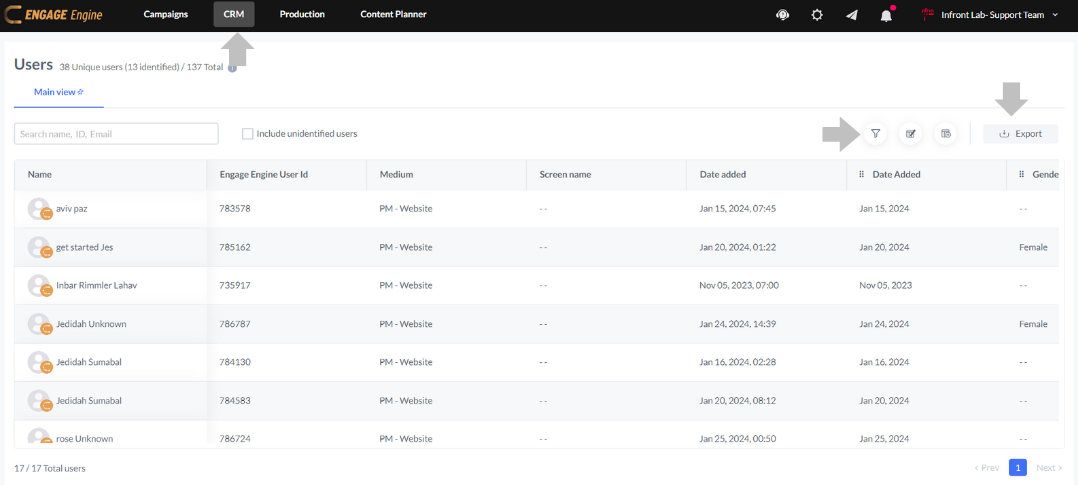
For comprehensive CRM exports, navigate to the CRM section and utilize the filtering options (campaign, date, data point, platform, etc.) to pinpoint the desired data. Then, click "Export" to download the filtered data.