
Guessing Game
Game Description
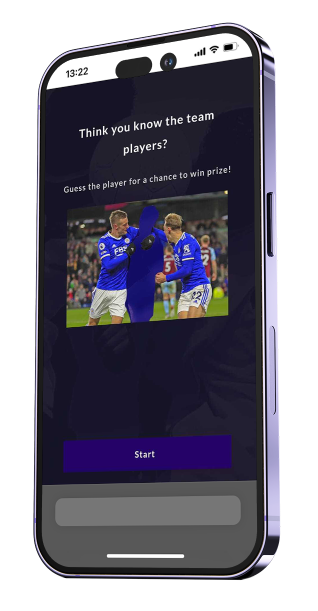
Guessing Game is an interactive challenge where participants must guess the correct answer based on provided hints. Hints can be text or images, and answers can be configured as multiple choice, multiple selection, or free text. This game enhances engagement by encouraging users to think critically and interact dynamically with the content.
Where & When to Use Trivia
Fan Engagement: Challenge fans to guess players, stadiums, or historic moments.
Educational Content: Provide learning-based quizzes where users solve riddles or identify key facts.
Sponsorship Activation: Integrate brand-related guessing challenges for increased sponsor visibility.
Pre-Game or Halftime Activities: Keep the audience entertained with interactive challenges.
Themed Campaigns: Use for special events, holidays, or promotional activities.
Inspiring Use Cases and Ideas
“Guess the Player” Challenge: Show a blurred image of a player and let fans guess their identity.
“Name That Moment” Quiz: Display a historic sports image and ask users to recall the event.
Sponsor-Driven Puzzles: Feature brand logos or products as guessing challenges.
Hidden Object Challenges: Fans search for and identify missing object in several images.
Trivia-Style Gameplay: Use hints to guide participants to the correct answer.Customization Options
Customization Options
Design Tab:
Hint Configuration
Users can add text or image hints to guide participants toward the correct answer.
Multiple hints can be provided for each question, progressively revealing more information.
Answer Configuration
Multiple Choice: Participants choose from predefined answers.
Multiple Selection: Participants select more than one answer.
Free Text: Participants enter their own response manually.
Correct Answers: Required for validating the response in multiple-choice and free-text modes.
Settings Tab
Answer Field Title: Customizable text to introduce the guessing challenge.
Answer Field Placeholder: Example text guiding users on how to enter their response.
Game Instructions: Display rules or hints on how to play the game.
Submit Button Text: Customizable button text for submitting answers.

Participation Limit: The Guessing Game is designed for a single attempt per user by default. Since the challenge relies on hints leading to a correct answer, allowing multiple attempts could compromise the integrity of the game experience.
Recommended Media Specs
Media Element | Media supported | Dimensions |
|---|---|---|
Hint Images | Image or video | 300 x 200 |
Answer media | Image or video | 410 × 250 px |
Post answer screen
After submitting an answer, participants can be shown a Post-Answer Screen with additional information, feedback, or media. This feature enhances engagement by providing more context to the user's response before proceeding to the next step.
To enable the Post-Answer Screen, at least one of the following fields must be filled:
Title: A headline or main text for the screen.
Subtitle: Additional descriptive text or instructions.
Media (600×400 px): An image or video to accompany the answer feedback.
Note:
If none of the above fields are populated, the Post-Answer Screen will remain disabled.
Limitations: The post-answer screen is not supported when using the Free Text answer type.