
Progressive Data Collection
Progressive Data Collection in Activation Engine enables dynamic and intelligent data gathering by adapting input fields based on previous user responses. Instead of repeatedly asking users for the same information, the system optimizes data collection through two key components: Conditional Input Appearance and Alternative Inputs. These mechanisms ensure a seamless user experience while maximizing the depth and accuracy of collected data.
Conditional Input Appearance
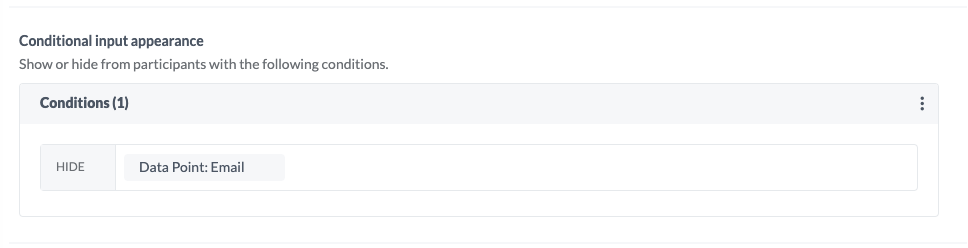
Conditional Input Appearance controls whether a data point appears in a form based on the participant’s existing data. If a user has already provided specific information in a previous interaction, the system can automatically hide or skip redundant fields, preventing unnecessary re-entry of the same data.

How It Works
Data Recognition: Activation Engine checks if a user has previously submitted a particular data point.
Auto-Hide Rule: If the data exists, the corresponding field is hidden, reducing friction in the user experience.
Smart Progression: If the data is missing, the input field is displayed, ensuring essential information is still collected.
Example Use Cases
If a user has already provided their email address, the system hides the email input field in subsequent activations.
A fan who has previously shared their favorite team will not be asked the same question again in future interactions.
If a participant has entered their phone number, the form automatically adjusts to request a different data point instead.
Note: By default, each newly added data point is automatically assigned a hidden condition in Conditional Input Appearance to ensure that the same input field does not appear twice for the user if already submitted.
Configuring Conditions for Conditional Input Appearance
When setting up conditions for Conditional Input Appearance, users can define specific rules to a condition, the system presents an interface (as shown in the image to the right) with the following options:
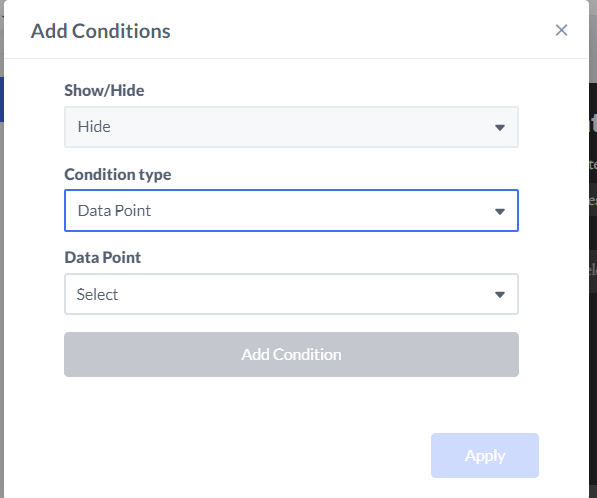
Show/Hide Toggle: Defines whether the selected data point should be displayed or hidden based on the condition.
Condition Type: Allows users to select the type of comparison used (e.g., checking for a previously submitted data point).
And/Or Logic: Determines whether multiple conditions must all be met (AND) or if meeting any condition suffices (OR). Shown when there is more than one condition added.
Once a condition is applied, the system ensures that the field's visibility is dynamically controlled across activations—not just within the current one.
Alternative Inputs
Note: In order to use Alternative Inputs, the associated data point must have a Conditional Input Appearance configured.
Additionally, once an Alternative Input is assigned to a data point, an icon will appear next to it in the data point list, making it easy to identify which data points have alternative inputs configured.

Alternative Inputs dynamically adjust the questions asked based on the presence (or absence) of previously collected data. Rather than skipping a field entirely, the system replaces it with a new, relevant question to collect additional insights.
How It Works
Data Assessment: The system determines whether the participant has provided a particular data point.
Input Replacement: If the data is present, a new question is displayed instead of the default input.
Layered Insights: This approach enables deeper user profiling across multiple interactions.
Example Use Cases
If a fan has already shared their favorite team, the system prompts them for their favorite player instead.
If a user has provided their age range, the system may follow up with a question about ticket purchasing preferences.
If a participant has submitted their location, the next interaction may ask for their preferred event venue instead of repeating previous questions.
Advanced Use: Layering Conditions with Alternative Inputs
For advanced configurations, when adding an Alternative Input, users can create an additional layer of Conditional Input Appearance to refine data collection dynamically. By strategically combining these features, users can implement complex, multi-step data collection flows, ensuring that each interaction captures progressively richer insights.
Additional Data Points
The Additional Data Points feature allows multiple data points to be linked to a single question, enabling richer insights by capturing multiple dimensions of user information within a single interaction. This enhances data structuring and reduces the need for repetitive questioning.

How It Works
Multi-Point Assignment: A single input field can store responses across multiple data points.
Comprehensive Profiling: By linking related data points, a more complete user profile can be built in fewer interactions.
Automated Data Structuring: Ensures that responses are categorized appropriately within different data point fields.
Example Use Cases
A fan that answered "I usually attend the team's games in the arena" can be assigned an additional data point "Send promotions for tickets", allowing targeted offers based on their engagement level.
Benefits of Progressive Data Collection
Enhanced User Experience: Reduces redundant data entry and streamlines interactions.
Increased Data Accuracy: Ensures only necessary and relevant information is requested.
Optimized Data Capture: Allows for layered data collection without overwhelming users.
Personalized Engagement: Enables dynamic questioning that adapts to user history.
By leveraging Progressive Data Collection, Activation Engine helps organizations collect rich, structured data without disrupting the user journey. This intelligent approach ensures continuous data enrichment while maintaining a frictionless and engaging experience for participants.