
Shootout Challenge
Unleash the thrill of competition and elevate your existing campaigns with the Shootout Challenge!
This highly adaptable, skill-based experience lets you capture your audience's attention with gameplay inspired by popular sports. Customize the theme and gameplay to perfectly align with your brand identity, sponsors, and target audience. Whether you want to boost participation in existing challenges, showcase sponsors, or drive engagement in Competition Campaigns, the Shootout Challenge provides a structured and engaging experience guaranteed to excite your fans.
The Game Plan: How It Works
When customizing the game, here are the elements you'll see that you can tailor to best fit your needs:
Choose Your Sport: Select from three exciting options: Soccer, Handball, or Hockey.
Set Attempts: Control the difficulty by setting the number of attempts, with a maximum of ten for a good balance between challenge and accessibility.
Winning Score: This automatically adjusts based on the chosen number of attempts, capping out at 50.
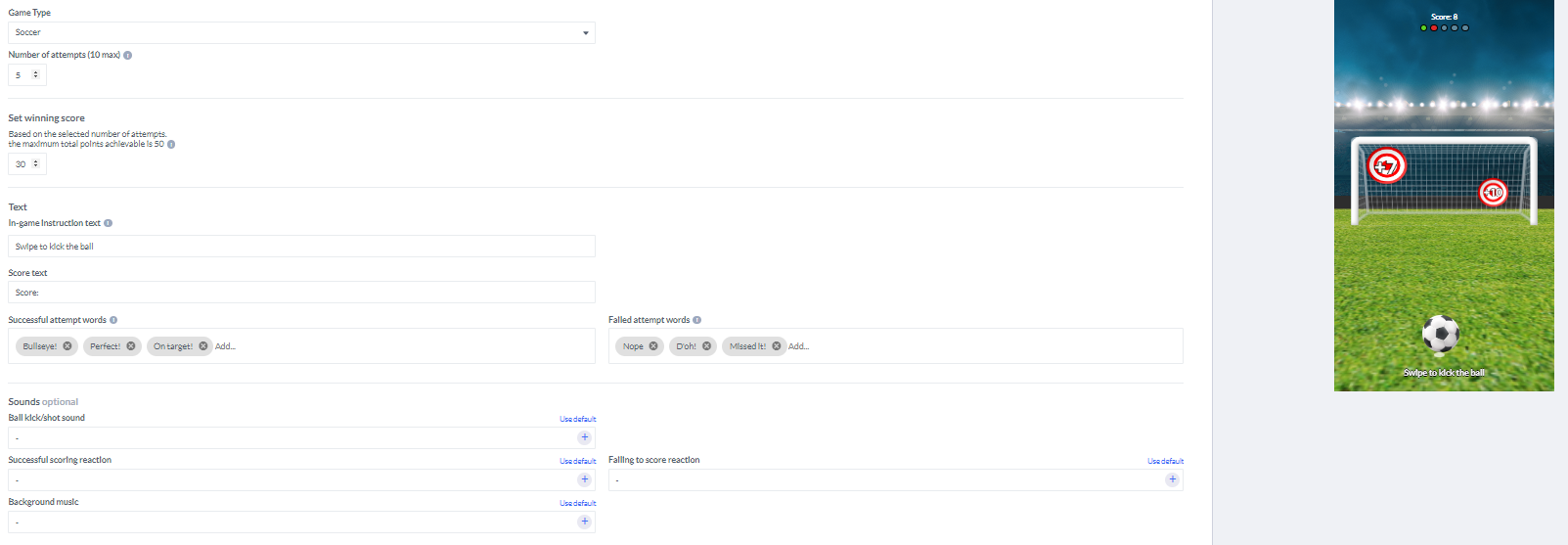
The activation's settings menu.

Define success by setting the winning score that determines participants' victory or defeat. Then, personalize the experience further by crafting unique end screens for both winners and those who fall short.
Design Customization for Your Activation
Customize these elements to create a Shootout Challenge activation that perfectly suits your organization or team's needs:
Success & Failure Indicators: Ensure clear differentiation between successful and unsuccessful shots. This visual feedback will guide your players.
Background and Playing Field Images: Customize the background and playing field images to match your chosen sport and enhance your campaign theme.
Target and Ball Customization: Change the target and ball images to reflect your chosen sport for a cohesive experience.

Shootout Challenge’s design settings
Key Points to Remember
Here are a few key points to remember when setting up your Shoutout Challenge activation to ensure a great fan experience:
Set the Challenge: Control the difficulty by determining the number of attempts players get, with a maximum of 10 for a good balance between challenge and accessibility.
Automatic Scoring: We've got your back! The winning score automatically adjusts based on the chosen attempts, ensuring a fair and balanced game.
Guide Your Players: Craft clear and concise in-game instructions to keep your fans informed and ensure a smooth and enjoyable playing experience.
Fuel the Excitement: Use engaging terms for successful and unsuccessful attempts to keep your game dynamic and interactive, motivating players to keep coming back for more!
Game Assets
Welcome Message Image: 573*300 px
Game Settings:
Background Image: 1000*600 px
Start Screen Image (optional): 600*400 px
Game:
Audience Background Image: 550*1440 px
Playing Field Image: 550*1440 px
Target Image: 200*200 px
Ball Image: 200*200 px
End Screen Image (optional): 600*400 px
Examples
Demos