
CRM
CRM in Engage Engine
Engage Engine's CRM serves as the central hub for managing and analyzing user data. It enables organizations to retrieve key audience insights, track user engagement, and segment participants based on collected data points. The CRM ensures that all user interactions within the platform are systematically structured, helping businesses drive better marketing, sales, and engagement strategies.
Understanding CRM Users
The CRM provides an overview of all users associated with an account, including total users and unique users (factoring in repeat participants). Users are classified as:
Identified Users: Users who have provided an email or phone number, allowing further engagement and targeted communication.
Unidentified Users: Users who have interacted with activations but have not provided personal contact information, limiting personalized outreach.
Checkbox Option: The CRM includes an "Include unidentified users" checkbox. When enabled, the system displays all users, regardless of identification status. When disabled, only users who have provided an email or phone number will be shown. By default, “Include unidentified users is” unchecked.
CRM Views and Customization
CRM Views
The CRM opens with a default "Main View", displaying all users in a structured table. Users can personalize their experience by filtering data, editing table columns, and saving new custom views.
Managing CRM Views
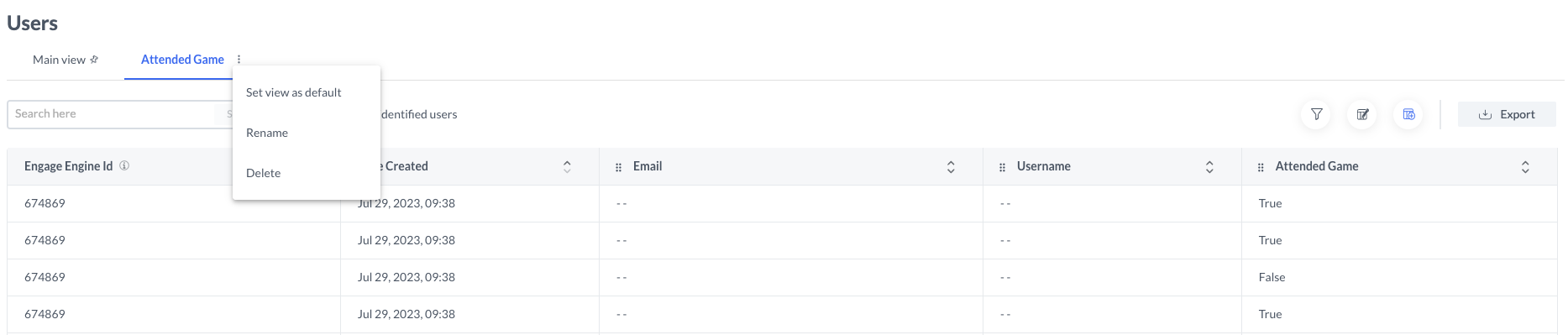
Rename a View: Click the three-dot menu next to the view name and select "Rename."
Pin a Default View: Select a preferred view and click "Save view as default" to ensure it appears upon accessing the CRM.
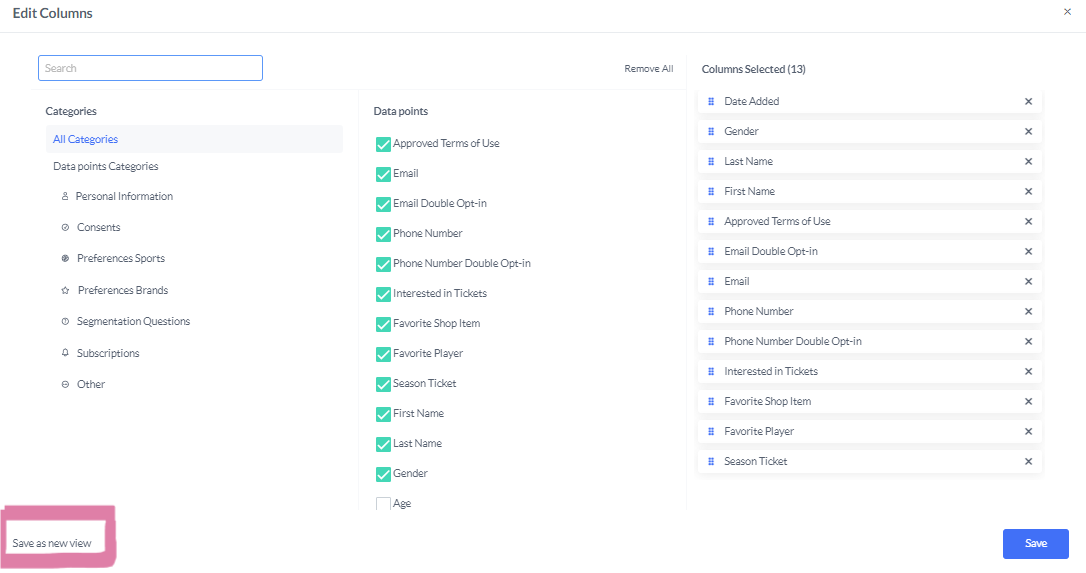
Adjust Columns: Add or remove columns to tailor the data display.

Predefined essential fields including Engage Engine ID, Date Added, and Email are locked to all views .
Filtering CRM Data
Users can apply filters to refine the CRM dataset and focus on specific user segments. Filters allow sorting users based on:
Campaigns or Activations they participated in, enabling targeted analysis.
Collected Data Points such as age, email, preferences, or specific engagement metrics.
Platforms where they engaged (e.g., Messenger, Instagram, web-based activations).
Filters can be combined using AND/OR logic, allowing flexible segmentation and user targeting based on multiple criteria.
Exporting CRM Data
The CRM enables exporting selected views for further analysis. Users can export data in:
XLSX (Excel) Format: For structured, spreadsheet-based reporting.
CSV Format: For easy data manipulation and integration with external tools.
Google Ads Customer Match: A CSV format optimized for uploading customer data to Google Ads.
Meta Custom Audiences: A CSV export designed for use in Meta’s advertising platforms.
Once an export is initiated, Engage Engine processes the request, and the download becomes available via a notification in the top-right menu bar.

Sensitive data such as email and phone numbers, are subject to data privacy regulations. Ensure compliance with relevant legal frameworks before exporting user information. For more info read the article Data Security and Compliance in Engage Engine
Learn more about exporting, in this article: Exporting Data Points Reports.
Leveraging CRM for Engagement
Engage Engine’s CRM extends beyond simple data storage. By segmenting users, tracking participation trends, and exporting relevant insights, businesses can:
Generate Qualified Leads by identifying high-engagement users.
Enhance Audience Segmentation to personalize marketing campaigns.
Streamline Customer Support with detailed interaction histories.
Optimize Data-Driven Decision Making by tracking trends over time.
By integrating custom views, filters, and export tools, Engage Engine's CRM empowers organizations to manage user data efficiently and optimize fan engagement strategies.